Time Break
The TimeBreak mechanism of RadChat is intended to encapsulate a group of messages for a given time interval. It can be either added manually or automatically.
Adding a TimeBreak Automatically
RadChat can automatically add a TimeBreak at a given interval. This can achieved by setting the AutoIncludeTimeBreaks property of RadChat to True. Also, the needed TimeSpan needs to be set to the TimeBreakInterval property of the control.
Adding a TimeBreak Manually
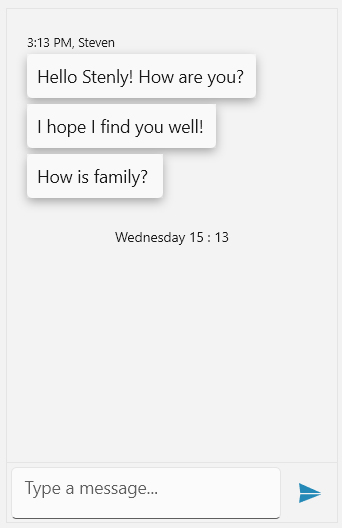
RadChat provides the AddTimeBreak method for adding a TimeBreak, which accepts a string parameter for its header.
Adding TimeBreak
var firstTextMessage = new TextMessage(this.otherAuthor, "Hello Stenly! How are you?");
var secondTextMessage = new TextMessage(this.otherAuthor, "I hope I find you well!");
var thirdTextMessage = new TextMessage(this.otherAuthor, "How is family? ");

this.chat.AddMessage(firstTextMessage);
this.chat.AddMessage(secondTextMessage);
this.chat.AddMessage(thirdTextMessage);

this.chat.AddTimeBreak(DateTime.Now.DayOfWeek.ToString() + " " + DateTime.Now.TimeOfDay.Hours.ToString() + " : " + DateTime.Now.TimeOfDay.Minutes.ToString());
Handling the AddingTimeBreak Event
The AddingTimeBreak event provides various information regarding the last MessageGroup and the Messages in it. Also, the event can be canceled. The following event arguments are exposed for this purpose.
-
Cancel: The event can be canceled by setting the property to True. -
Header: Provides information regarding the currentHeaderthat is to be set for theTimeBreak. LastMessageGroup
The LastMessageGroup itself provides the following information.
-
Alignment: Gets the alignment of theMessageGroup. -
Author: The group's Author instance. -
AvatarAlignment: Gets the alignment of theAvataraccording to theCurrentAuthor. -
CreationDate: Gets the time when the firstMessageof the group was created. -
Messages: The collection of all messages within the group.