Modify the Content of Content Controls (SDTs) using WordsProcessing
Environment
| Version | Product | Author |
|---|---|---|
| 2025.4.1104 | RadWordsProcessing | Yoan Karamanov |
Description
Structured Document Tags (SDTs), also known as Content Controls, are implemented in WordsProcessing using annotation markers. The markers are placed before and after the control’s content - SdtRangeStart at the beginning and SdtRangeEnd at the end. To modify the content of a content control, you must change the document elements between these two markers.
Solution
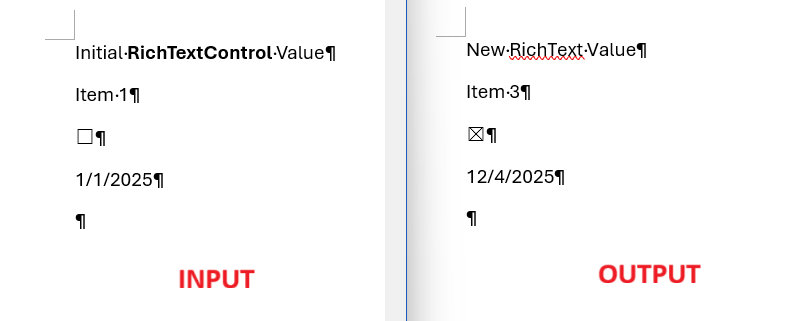
The following example covers:
-
Load and parse: Imports an input DOCX using DocxFormatProvider and retrieves all SDTs via EnumerateChildrenOfType
() . - Classify by alias: Iterates each SDT and uses SdtProperties.Alias to route updates for specific control types: "RichText", "ComboBox", "CheckBox", and "DatePicker".
- Preserve formatting: For inline SDTs, collects all Run elements between SdtRangeStart and SdtRangeEnd, removes all but the first Run, and reuses that first Run to keep existing text formatting.
-
Update values:
- RichText: Sets the first run’s Text to the new string.
- ComboBox: Sets the first run’s Text to the selected item display text (e.g., "Item 3").
- CheckBox: Toggles CheckBoxProperties.Checked and updates the glyph in the first run using the appropriate SdtCheckBoxState (font + character code).
- DatePicker: Formats DateTime.Now using the SDT’s DateProperties.DateFormat and assigns the result to the first run’s Text.
- Save and open: Exports the modified RadFlowDocument back to DOCX and opens the file to verify the changes.
const string InputFile = "input.docx";
const string OutputFile = "output.docx";

static void Main(string[] args)
{
    var provider = new DocxFormatProvider();
    var document = provider.Import(File.ReadAllBytes(InputFile), null);
    var sdtRangeStarts = document.EnumerateChildrenOfType<SdtRangeStart>().ToList();

    foreach (var sdtRangeStart in sdtRangeStarts)
    {
        if (sdtRangeStart.SdtProperties.Alias == "RichText")
        {
            ChangeRichTextValue(sdtRangeStart, "New RichText Value");
        }
        else if (sdtRangeStart.SdtProperties.Alias == "ComboBox")
        {
            ChangeComboBoxValue(sdtRangeStart, "Item 3");
        }
        else if (sdtRangeStart.SdtProperties.Alias == "CheckBox")
        {
            ChangeCheckBoxValue(sdtRangeStart);
        }
        else if (sdtRangeStart.SdtProperties.Alias == "DatePicker")
        {
            ChangeDatePickerValue(sdtRangeStart, DateTime.Now);
        }
    }

    var bytes = provider.Export(document, null);
    File.WriteAllBytes(OutputFile, bytes);
    Process.Start(new ProcessStartInfo(OutputFile) { UseShellExecute = true });
}

private static void ChangeDatePickerValue(SdtRangeStart sdtRangeStart, DateTime now)
{
    var firstRun = ReturnFirstRunAndRemoveOthersFromSdt(sdtRangeStart);

    var properties = (DateProperties)sdtRangeStart.SdtProperties;
    firstRun.Text = now.ToString(properties.DateFormat);
}

private static void ChangeRichTextValue(SdtRangeStart sdtRangeStart, string value)
{
    var firstRun = ReturnFirstRunAndRemoveOthersFromSdt(sdtRangeStart);

    firstRun.Text = value;
}

private static void ChangeComboBoxValue(SdtRangeStart sdtRangeStart, string value)
{
    var firstRun = ReturnFirstRunAndRemoveOthersFromSdt(sdtRangeStart);

    firstRun.Text = value;
}

private static void ChangeCheckBoxValue(SdtRangeStart sdtRangeStart)
{
    var firstRun = ReturnFirstRunAndRemoveOthersFromSdt(sdtRangeStart);
    CheckBoxProperties properties = (CheckBoxProperties)sdtRangeStart.SdtProperties;
    if (properties.Checked.HasValue && properties.Checked.Value)
    {
        properties.Checked = false;

        // If check box is currently checked, change it to unchecked
        ApplyNewCheckBoxState(firstRun, properties.UncheckedState);
    }
    else
    {
        properties.Checked = true;

        // If check box is currently unchecked, change it to checked
        ApplyNewCheckBoxState(firstRun, properties.CheckedState);
    }
}

private static void ApplyNewCheckBoxState(Run run, SdtCheckBoxState state)
{
    if (run != null)
    {
        run.Properties.FontFamily.LocalValue = new ThemableFontFamily(state.Font);
        run.Text = ((char)state.CharacterCode).ToString();
    }
}

private static Run ReturnFirstRunAndRemoveOthersFromSdt(SdtRangeStart sdtRangeStart)
{
    var runs = GetRunsInsideSdt(sdtRangeStart);

    // Remove all but the first run inside the SdtRangeStart
    // We want to keep the first run because it contains the formatting of the text
    var paragraph = sdtRangeStart.Paragraph;
    for (int i = 1; i < runs.Count; i++)
    {
        paragraph.Inlines.Remove(runs[i]);
    }

    return runs[0];
}

private static IList<Run> GetRunsInsideSdt(SdtRangeStart sdtRangeStart)
{
    List<Run> runs = new List<Run>();
    var paragraph = sdtRangeStart.Paragraph;
    var sdtStartIndex = paragraph.Inlines.IndexOf(sdtRangeStart);
    for (int i = sdtStartIndex + 1; i < paragraph.Inlines.Count; i++)
    {
        if (paragraph.Inlines[i] is SdtRangeEnd sdtRangeEnd && sdtRangeEnd.Start == sdtRangeStart)
        {
            return runs;
        }

        if (paragraph.Inlines[i] is Run run)
        {
            runs.Add(run);
        }
    }

    // It is possible that the SdtRangeEnd is inside another Paragraph
    // For demo purposes we will handle only the case where the SdtRangeEnd is in the same Paragraph
    return runs;
}
Notes
- Use RadFlowDocumentEditor for higher-level operations like inserting SDTs via InsertStructuredDocumentTag.
- The content control type (plain text, combo box, checkbox, etc.) is available through SdtProperties.Type. Adjust the replacement logic based on the control type when necessary.
- Content controls can exist at different levels (block, inline, row, cell). Ensure you modify the correct collection (Inlines, Blocks, Cells, etc.) depending on where the SDT is placed. See Content Controls.