Hiding Days Not of the Current Month in RadCalendar for WinForms
Environment
| Product Version | Product | Author |
|---|---|---|
| 2024.3.806 | RadCalendar for WinForms | Dinko Krastev |
Description
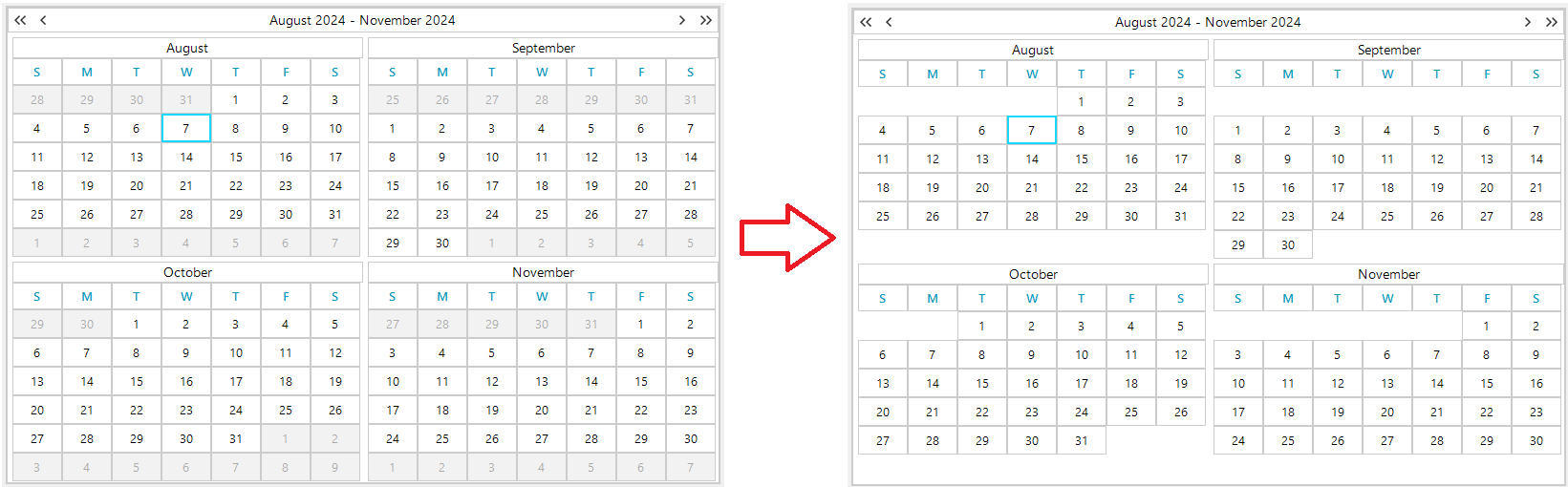
In certain scenarios, you might want to enhance the visual clarity of the RadCalendar by hiding days that do not belong to the current month. This article guides you through the process of achieving such customization, particularly when the AllowMultipleView property is set to true.
Solution
To hide days that are not part of the current month in RadCalendar, handle the ElementRender event. Within this event handler, use the OtherMonth property of CalendarCellElement to determine if a day belongs to the current month. If OtherMonth returns true, set the cell's visibility to Hidden.
Here's a code snippet demonstrating how to implement this solution:
private void RadCalendar1_ElementRender(object sender, RenderElementEventArgs e)
{
    var cell = e.Element as CalendarCellElement;
    if (cell.OtherMonth)
    {
        cell.Visibility = ElementVisibility.Hidden;
    }
}
To apply this approach, first, ensure the AllowMultipleView property of your RadCalendar is set according to your requirements. Next, subscribe to the ElementRender event of RadCalendar and include the code above in your event handler. This customization will hide all days that do not belong to the current month, providing a cleaner and more focused calendar view.
Notes
- The
ElementRenderevent is a key point for customizing the appearance of calendar cells. - The
OtherMonthproperty is crucial for identifying days that belong to months other than the current one.