Resolving Invalid License Watermark When Using Telerik Reporting in Website Projects
Environment
| Area | Licensing |
| Version | 19.0.25.211+ |
Description
I have an older ASP.NET Website project that uses Telerik Reporting to generate reports. Despite following all licensing documentation, downloading the license key, using NuGet packages, and VB script files, the reports display an invalid license watermark.
Other Telerik controls, such as grids, work without issues. Re-running the Reporting Upgrade Wizard completes without errors, and all files in the bin directory are updated to the latest versions.
Solution
To resolve the invalid license watermark issue:
- In the Website project, add a reference to the
Telerik.Licensing.Runtime.dllassembly. A copy of it can be found in the Bin subfolder of the Telerik Reporting installation directory(e.g.C:\Program Files (x86)\Progress\Telerik Reporting 2025 Q4\Bin). - Navigate to the License Keys page in your Telerik account.
- Scroll down the page until you reach the Progress® Telerik® Reporting product. Open and copy the Script key.
-
Add a
TelerikLicense.vb/TelerikLicense.csfile to your project with the content of the copied Script key. This file must be placed in the App_Code folder.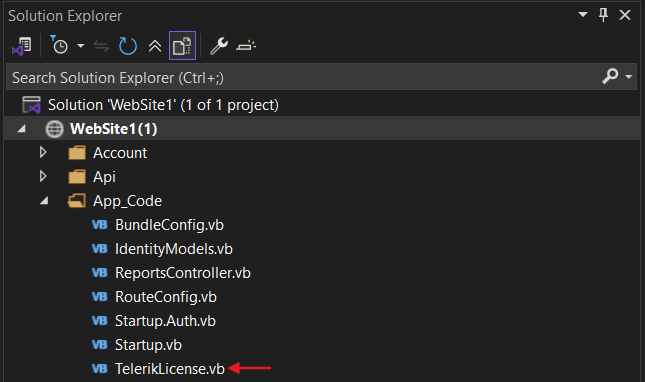
The image shows where the TelerikLicense file (
TelerikLicense.vborTelerikLicense.cs) should be located in the Website project. Rebuild the project and run it again to verify that the license has been applied correctly.
Notes
Please verify that the script key includes all purchased Telerik licenses. If other Telerik products are used in the project, their Script keys must also be added to the same TelerikLicense.vb/TelerikLicense.cs file.
If there are further issues, please refer to the Fixing License Errors in Telerik Reporting Runtime article.